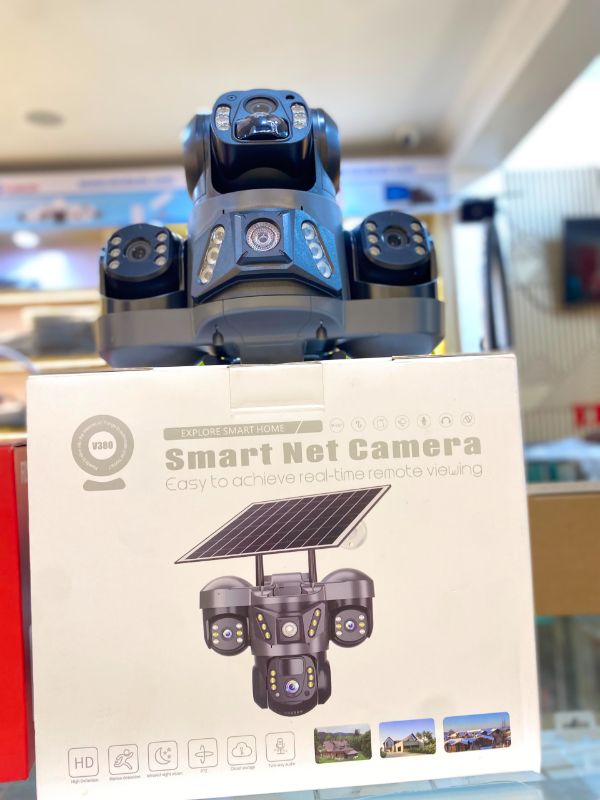
V380 Pro Triple-Lens Solar-Powered Outdoor Security Camera
Product Price
RWF220,000 RWF240,000
Description
Key Features
Multi-Screen Monitoring: Displays simultaneous distinct views (e.g., fixed wide-angle views alongside a movable PTZ feed).
Zero Electricity Bills: Fully sustained by a high-efficiency solar panel and high-capacity internal backup battery.
Two-Way Audio: Equipped with a built-in microphone and speaker for real-time remote intercom communication.
Smart Detection & Night Vision: Features AI humanoid motion tracking, instant mobile push alerts, and dual-light full-color night vision.
Storage Options: Local logging via a MicroSD card slot (supports up to 128GB) alongside optional encrypted cloud storage. [1, 2, 3, 4, 5, 6, 8]
Initial Setup Guide
Pre-Charge & Card Installation: Keep the camera switched off. Insert a standard MicroSD card and—if using the 4G variant—an active 4G SIM card without a PIN lock into their respective physical slots under the weather-sealed rubber cover. Before mounting outdoors, fully charge the internal battery via a standard 5V USB wall charger. [1, 2, 3]
App Preparation: Download the official V380 Pro app from the Google Play Store or Apple App Store. Launch the app and register a new user account. [1, 2]
Power On & Reset: Turn on the camera's physical power switch. Wait for the startup chime and voice prompt ("System is starting... System startup completed"). Use a pin to press and hold the reset button for 5 seconds until you hear "Reset completed". [1, 2, 3]
App Pairing: Open the app and tap the "+" (Add Device) icon in the upper-right corner. Use your phone to scan the unique setup QR code printed on the camera body or the box.
For Wi-Fi models: Select your local 2.4GHz Wi-Fi network name, input the password, and let the app generate a pairing QR code. Hold your phone's screen 6–10 inches in front of the camera lens until it prompts "Received configuration information... Network connected".
For 4G models: The camera will automatically seek a cell signal and say "Network connected" once it establishes a handshake with your mobile carrier. [1, 2, 3, 4, 5, 6, 7]
Physical Mounting: Install the camera bracket in an outdoor location that receives plenty of unshaded direct sunlight throughout the day to keep the solar panel continuously charging. [1]
Product Information
- Brand
- BUY CCTV CAMERA IN RWANDA
- Tag
- CCTV CAMERA